

Download Acid Pro – Professional Music Production Software
Overview of Acid Pro
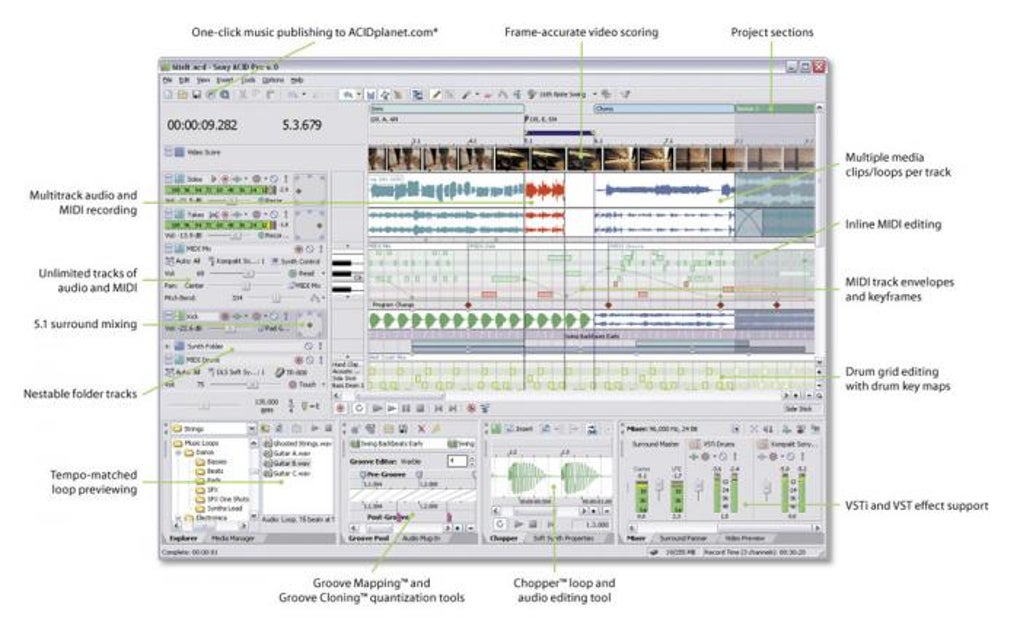
Acid Pro positions itself as “your new creative partner” for musicians, producers, and sound‑design enthusiasts who demand a full‑featured digital audio workstation (DAW) without the bloat of enterprise‑level suites. Developed by MAGIX, Acid Pro delivers a traditional mixer layout, powerful loop‑based sequencing, and a deep set of editing tools that let you work with high‑resolution audio up to 24‑bit/192 kHz. Whether you’re crafting electronic dance tracks, scoring a short film, or polishing a podcast, the software offers a blend of intuitive drag‑and‑drop workflow and granular control over pitch, modulation, and expression. A free trial provides full access to the core features, allowing users to evaluate the stability, UI responsiveness, and plug‑in compatibility before committing to a purchase. Acid Pro shines when you need precise clip‑level editing, non‑destructive audio manipulation, and reliable VSTi integration—making it a solid choice for both seasoned engineers and ambitious hobbyists ready to take their productions to a professional level.
Key Features That Set Acid Pro Apart
- High‑resolution audio support up to 24‑bit/192 kHz for crystal‑clear playback.
- Loop‑based sequencing with unlimited tracks and real‑time stretch.
- Traditional mixer panel with pan, volume, mute, solo, and group routing.
- Comprehensive VSTi and VST effects compatibility, including soft‑synth reset.
- Advanced MIDI editing with SysEx‑only file import and keyframe visualization.
- Non‑destructive clip editing – copy/paste complex sections without loss.
- ReWire support for seamless integration with other DAWs.
- Automation lanes for pitch, modulation, expression, and effect parameters.
- Built‑in mastering suite with multiband compression and limiting.
- Export options for WAV, MP3, AIFF, and OGG at customizable bitrates.
These features combine to create a workflow that feels both familiar to veterans of analog mixing consoles and fresh to newcomers who prefer a visual, timeline‑driven environment. The inclusion of robust MIDI handling, especially the ability to load SysEx‑only files, is a rare advantage for producers who work with hardware synthesizers. Meanwhile, the recent updates that resolve VSTi exception crashes and improve ASIO stability demonstrate MAGIX’s commitment to maintaining a reliable production platform. Whether you’re layering loops, sculpting synth patches, or mastering a final mix, Acid Pro provides the tools you need without forcing you to navigate a maze of hidden settings.
Installation, Setup, and System Compatibility
Step‑by‑Step Installation Guide
1. Download the installer from the official MAGIX website. The file is a small ~200 MB EXE for Windows; Mac users can obtain a compatible version via a Windows emulator or Boot Camp, as Acid Pro is currently Windows‑only.
2.
Run the installer with administrator privileges. The wizard will prompt you to accept the license agreement and select an installation folder (default: C:\Program Files\Acid Pro).
3. Choose optional components such as additional VSTi libraries, sample packs, and the ReWire bridge.
Installing these during the initial setup saves time later.
4. Complete the installation and launch the application. The first run will ask you to register the free trial using an email address; this unlocks the full feature set for 30 days.
5.
Configure audio settings in the Preferences menu: select your audio driver (ASIO for low latency, WASAPI for Windows 10+), set the sample rate (44.1 kHz or 48 kHz for most projects), and enable any external MIDI devices.
Operating System Requirements
Acid Pro 2024 officially supports Windows 10 (64‑bit) and Windows 11 (64‑bit). Minimum hardware requirements include a dual‑core processor at 2 GHz, 4 GB RAM, and 2 GB of free disk space. For optimal performance with large multi‑track sessions, MAGIX recommends an Intel i5/i7 or AMD Ryzen 5/7 processor, 8 GB+ RAM, and an SSD for project storage. While a native macOS version is not yet available, users can run Acid Pro on macOS through virtualization tools (Parallels Desktop, VMware Fusion) that provide a Windows environment. The software also works with most USB and PCIe audio interfaces, including Focusrite Scarlett, PreSonus AudioBox, and Universal Audio Apollo series.
During the initial trial, you’ll notice that the UI scales gracefully on high‑DPI monitors, and the mixer panel can be detached for a dual‑monitor setup. If you encounter plugin crashes, the updated “Enable” button in the Soft Synth Properties dialog allows you to reset the offending VSTi without restarting the DAW—an improvement that many users have praised in recent forums. Overall, the installation process is straightforward, and the system compatibility covers the majority of modern Windows‑based production rigs.
Pros, Cons, and Frequently Asked Questions
Pros and Cons Summary
- Pros:
- High‑resolution audio handling and unlimited track count.
- Intuitive loop‑based workflow combined with deep editing tools.
- Robust VSTi/VST support with recent stability fixes.
- Comprehensive automation and mastering suite.
- Free trial provides full feature access for evaluation.
- Cons:
- Windows‑only native application; macOS users need virtualization.
- Steeper learning curve for absolute beginners unfamiliar with DAW terminology.
- Some advanced features (e.g., surround mixing) require additional add‑ons.
- Interface may feel dated compared to newer DAWs with modern skins.
Frequently Asked Questions
Can I use third‑party VST plugins with Acid Pro?
Yes. Acid Pro supports 64‑bit VST2 and VST3 plugins. The recent update adds a reset button for soft‑synths that encounter exceptions, making third‑party integration smoother.
Is there a Mac version of Acid Pro?
A native macOS version is not available yet. Mac users can run Acid Pro via Boot Camp, Parallels Desktop, or other Windows virtualization solutions.
What is the length of the free trial?
The free trial lasts for 30 days and provides unrestricted access to all features, including VSTi support and export options.
Can I export projects to other DAWs?
Acid Pro can export stems as WAV or AIFF files and can also save MIDI tracks, which can be imported into most other DAWs like Ableton Live, Logic Pro, or FL Studio.
Does Acid Pro support ReWire for multitrack syncing?
Yes. ReWire support allows you to route audio and MIDI between Acid Pro and compatible DAWs such as Reason or REAPER, enabling complex hybrid workflows.
Acid Pro delivers a compelling mix of classic DAW workflow and modern loop‑based creativity. The high‑resolution audio engine and extensive VST support make it a serious contender for professional producers, while the free trial lowers the barrier for hobbyists. Minor drawbacks like Windows‑only support and an older UI design keep it from a perfect score, but overall it offers excellent value for its price point.
Final Verdict – Should You Download Acid Pro?
If you are looking for a feature‑rich, Windows‑focused DAW that balances a traditional mixer experience with powerful loop‑based composition tools, Acid Pro is a strong candidate. Its ability to handle 24‑bit/192 kHz audio, seamless VSTi integration, and robust automation make it suitable for everything from electronic music production to post‑production scoring. The free 30‑day trial lets you explore the full suite without commitment, and the recent stability patches address many of the concerns older users reported. While macOS users will need to rely on virtualization and beginners may face a learning curve, the overall value, especially at the current market price, justifies the download.
Ready to elevate your music productions? Download Acid Pro now and start your free trial. Experience professional‑grade editing, mixing, and mastering tools that will help you turn ideas into polished tracks—fast, secure, and with the confidence that comes from a mature, industry‑tested platform.







